 aux
The best music overlays for gaming in 2026
Updated October 31, 2026 · Checked against each app's own listing
The best music overlay for most gamers is aux: it's free, works on both Mac and Windows, follows Spotify or Apple Music with no sign-in, and stays on screen over fullscreen games. On Windows with Spotify only, Xbox Game Bar's Spotify widget is the built-in choice. If you only play Overwolf-supported games and have Premium, Musme is another option.
We make aux, so weigh our pick accordingly. Everything below about the other apps comes from their own store listings and help pages, and we've kept the limits of aux in too. If something here is out of date, tell us on our Discord and we'll fix it.
At a glance
| Overlay | Mac | Windows | Music apps | Price | Best for |
|---|---|---|---|---|---|
| aux | Yes | Yes | Spotify, Apple Music (SoundCloud on Mac) | Free; optional $2.99 worlds | Anyone, any game, Mac or PC |
| Xbox Game Bar | No | Yes | Spotify | Free, built in | Spotify on Windows, nothing to install |
| Steam overlay | Yes | Yes | No Spotify control built in | Free | Steam game soundtracks |
| Musme (Overwolf) | No | Yes | Spotify | Free with ads; controls need Premium | League, Valorant, CS2 players already on Overwolf |
| Spotify Miniplayer | Yes | Yes | Spotify | Premium only | Windowed games and desktop work |
| Lyric Overlay | Yes | Yes | Lyrics for what's playing | Freemium subscription | Lyrics only |
1. aux: the music overlay built for games
aux is a free music overlay for Mac and Windows games: it floats over whatever you play and shows your Spotify or Apple Music song, so you can skip, see synced lyrics and listen along with friends without alt-tabbing. It talks to the music app you already have, so there's no account to link, and skip and pause work whether or not you pay for Spotify.
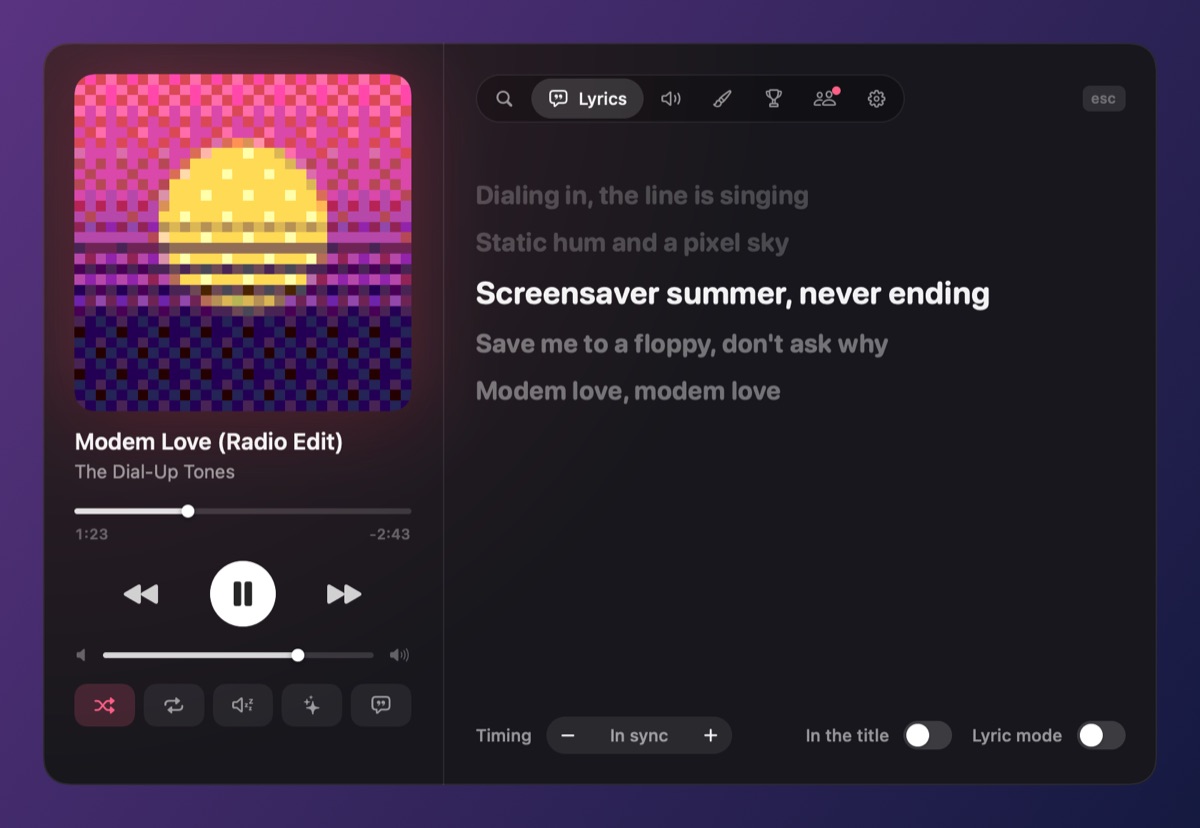
- Over a match: it turns into mini mode, a slim pill, by itself when a fullscreen game is in front, and lets your clicks through.
- Extras: synced lyrics, eight visualizers, listening along and shared queues with friends (Mac and PC together), PlayStation and Xbox controller controls, a Discord status, and pixel pets.
- Weight: on Windows it's one small native exe with a budget of under 30 MB of memory and half a percent of CPU while playing. It never injects into games.
- The catch: it's in beta, so there's a waitlist. On Windows, exclusive fullscreen is the hardest case for any overlay; borderless fullscreen is the safest setting.
2. Xbox Game Bar's Spotify widget
Windows 10 and 11 come with Xbox Game Bar. Press Win + G in a game, add the Spotify widget from the widget menu, and link it to the Spotify desktop app. You can pin it with the pin button so it stays over the game after Game Bar closes.
- Good: nothing to install, made by Microsoft and Spotify, works in most games.
- Limits: Windows only, Spotify only. It's a remote rather than an overlay: no lyrics, friends or mini mode. It needs the Spotify desktop app running, and linking sometimes fails. Exclusive fullscreen games can hide it; the usual fix is to switch the game to borderless.
More detail: aux vs. Xbox Game Bar.
3. The Steam overlay
Press Shift + Tab in a game launched through Steam and the overlay opens over it, with your friends list, a web browser and the soundtracks you own on Steam. There's no Spotify control built in today, and it only shows while you hold it open.
- Good: already there for Steam games, on Windows, Mac and Linux.
- Limits: only games launched through Steam; no now-playing display while you play; nothing for Spotify or Apple Music beyond the browser.
More detail: aux vs. the Steam overlay.
4. Musme, on Overwolf
Musme is a free Spotify overlay that runs inside Overwolf, the Windows app platform for in-game add-ons. It shows the current song in a corner you choose, can be resized, and works in the games Overwolf supports, such as League of Legends, CS2, Minecraft and Valorant.
- Good: small, hotkeys, made for those games.
- Limits: its listing says play, pause, skip and liking a song need Spotify Premium, because it goes through Spotify's web API. Windows and Overwolf only, with ads, and Spotify only.
More detail: aux vs. Overwolf's Spotify overlays.
5. Spotify's Miniplayer
Since 2024 the Spotify desktop app on Windows and Mac has a Miniplayer: a small window that stays on top of other windows and can be shrunk to a bar. It's for Premium subscribers.
- Good: official, and fine over windowed games and while working.
- Limits: it's a normal window, so fullscreen games usually cover it (on a Mac, a fullscreen game has its own Space). Premium only, Spotify only.
6. Lyric Overlay
Lyric Overlay shows live, synced lyrics for what's playing in an always-on-top window, on Windows and Mac. Its listing describes it as freemium, with a subscription.
- Good: if lyrics are all you want, it's made for exactly that.
- Limits: lyrics, not a player. aux has synced lyrics too, in its Hub and on the cover in lyric mode, along with the rest of the player.
How we compared them
We looked at what matters while you play: whether it stays visible over a fullscreen game, whether it works on Mac, which music apps it follows, whether skip and pause need a paid Spotify account, and what it costs. We left out stream widgets (StreamElements, Streamlabs, OBS "now playing" sources), since they show the song to your viewers, not to you.
Questions
What's the best Spotify overlay for gaming?
aux, if you want one that stays on screen over fullscreen games on Mac or Windows, needs no Spotify login and adds lyrics and friends. On Windows, Xbox Game Bar's Spotify widget is the built-in alternative.
Is there a music overlay for Mac games?
Yes: aux runs on macOS 13 or later and floats over Mac games, with Spotify, Apple Music or SoundCloud. Game Bar and Overwolf are Windows only. More on aux for Mac.
Do I need Spotify Premium for a music overlay?
Not for aux or Game Bar's widget. Overlays that go through Spotify's web API, such as Musme, need Premium for play, pause and skip, and Spotify's own Miniplayer is Premium only.
Which music overlay works in fullscreen?
aux and Game Bar's pinned widget are made to show over games. On Windows, exclusive fullscreen can hide any overlay; borderless fullscreen avoids that. How to fix it.
Your next match needs a soundtrack.
aux is free for Mac during the beta, with Windows in testing. Leave your email and we'll tell you the moment it opens.